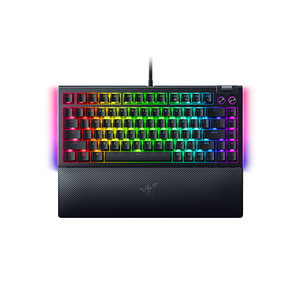
Razer BlackWidow V4 75% review
The Razer BlackWidow V4 75% is for a particular kind of keyboard buyer: someone who wants to reclaim desk space without giving up the function row, arrow keys or dedicated media controls. This exact model is the black US version with pre-installed Razer Orange Tactile Mechanical Switches Gen-3. Its appeal is not simply that it is smaller than a full-size keyboard; it is that the compact layout still feels familiar while the internal design leaves room for later customization.
That distinction makes the buying decision more practical than a simple size comparison. A smaller board can create space for a mouse, but missing navigation keys can make everyday work awkward. A conventional gaming keyboard can be easy to live with, but fixed switches limit experimentation. The BlackWidow V4 75% sits between those approaches, adding hot-swapping without abandoning the controls many desktop users reach for regularly.
Razer describes the board as a compact, hot-swappable mechanical keyboard powered by Chroma RGB. The supplied configuration includes switches, keycaps and a wrist rest, unlike the separately listed barebones version. It can therefore serve as a normal gaming keyboard immediately, while also giving an owner a route into switch and keycap changes later.
The strongest case for this model is balance rather than a single headline feature. It has a 75% layout, tactile stock switches, per-key lighting, side underglow, direct media controls and a wired USB-C connection. The compromises are equally clear: there is no number pad, no wireless mode, and the software may take time to navigate.
Layout and desk fit
A 75% keyboard keeps more of a conventional layout than a 60% board. Razer says this form factor includes the function row, arrow keys, Delete, Page Up, Page Down and Insert keys. Those keys matter for office shortcuts, editing, browsing and game commands, so this layout avoids the more dramatic adjustment required by a compact board that hides them behind a function layer.
PC Gamer characterizes the BlackWidow V4 75% as smaller than a tenkeyless keyboard and larger than a 60% keyboard. That description captures the practical middle ground: it is not the narrowest mechanical format, but it removes some width without stripping away the controls most people use often. The arrangement should be easier to adopt than a minimalist gaming layout.
The missing section is the number pad. Laptop Mag identifies the 75% model as the narrower version without a number pad. Buyers who enter figures frequently, use spreadsheet navigation heavily or rely on dedicated arithmetic keys should treat that omission as a workflow issue, not merely a space-saving detail.
Laptop Mag lists an approximate footprint of 12.6 inches by 6.1 inches. That footprint can suit a desk where mouse clearance matters, but the depth still deserves attention. The supplied wrist rest extends the usable palm-support area, so measure the front-to-back space available rather than checking only whether the keyboard fits between the monitor and mouse.
The 75% format also changes how the board looks on a desk. It is shorter than a full-size keyboard but retains a fairly complete upper control area, so it does not have the sparse appearance of a 60% model. If you want a smaller footprint while keeping a recognizable work layout, that visual and functional compromise is the product’s central proposition.
Build and physical controls
Razer describes a 5052 aluminum alloy top case and ABS plastic bottom case. This is mixed-material construction rather than an all-metal enclosure. That distinction matters if you are comparing it with a custom keyboard sold primarily on the weight and feel of a completely metal case.
The manufacturer’s component list includes a two-level kickstand. That gives the board two raised positions in addition to its resting position, allowing the typing angle to be adjusted. The useful point is flexibility: a raised setting may suit one desk and wrist position, while another user may prefer the flatter base.
At the top right, the keyboard has a multifunction roller and two media keys. Razer says the controls can handle tasks such as playback, brightness and volume. Laptop Mag identifies the physical buttons as pause/play and mute, making the cluster useful for quick changes without relying entirely on function shortcuts or an operating-system control panel.
The two-button arrangement is a limitation compared with larger BlackWidow models. PC Gamer notes that the 75% version has two media buttons instead of four. That is enough for common pause and mute actions, but buyers who want several dedicated transport commands should consider a larger board or a separate programmable controller.
The included wrist rest attaches magnetically and uses a plush leatherette design, according to Razer. PC Gamer and Laptop Mag both describe the cushioning positively in their independent reviews. It is not a reason to buy the keyboard by itself, but it makes the compact board more accommodating for people who prefer palm support during longer desk sessions.
Switches and typing character
This listing uses Razer Orange Tactile Mechanical Switches Gen-3. Razer positions them as tactile switches with quieter actuation and a bump without click sounds. Laptop Mag lists a 50-gram actuation force and 3.5-millimeter key travel, so the stock configuration is designed around tactile feedback rather than an uninterrupted linear press or an audible click.
Razer says the switches are factory lubricated with Krytox GPL 205g0. Laptop Mag also reports factory lubrication. That matters to a buyer who wants a smoother stock starting point and does not want switch maintenance to be the first project after opening the box.
Independent findings are favorable, but they remain reviewer impressions rather than universal measurements. PC Gamer describes the Orange switches as quieter than Razer Green Clicky switches. Laptop Mag reports that the switches provide a comfortable typing feel and sound. Together, those findings support the stock setup as a plausible choice for mixed gaming and ordinary writing.
Tactility is still a preference question. The bump gives physical feedback during a keypress, which some typists prefer for deliberate input. Players who prefer a consistent, uninterrupted press may instead want a linear switch. Razer lists separately sold Green Clicky and Yellow Linear switch packs for owners who want a different direction.
The supplied sources do not establish an adjustable actuation point for the Orange switches. That makes the hot-swap socket more important than any claim of software-based switch tuning: customization here means physically replacing compatible switches, not changing the stock switch’s actuation behavior through an application.
Hot-swap and modification
Razer says the socketed PCB accepts most standard 3-pin or 5-pin mechanical switches. This is the board’s main enthusiast feature. An owner can change the key feel by replacing switches instead of buying another keyboard, provided the replacement switches use the supported mechanical format.
The included 2-in-1 tool removes both keycaps and switches, according to Razer. The process is more approachable than soldering a board from scratch, but it still rewards care. A switch should be pulled with its pins aligned to the socket; forcing a misaligned switch can create a repair problem even when the design itself is intended to be accessible.
Razer also says the PCB has the holes needed for most screw-in stabilizers. That expands the modification path beyond switches, particularly for users who want to tune larger keys. It is a deeper project than a switch swap, however, because the case must be opened and the existing stabilizer arrangement must be changed.
The sources disagree about the number of underside screws, so this review does not give a screw count or a disassembly procedure. Ease of access should not be confused with unlimited support. Razer explicitly excludes internal damage caused by modification from its warranty coverage, so aggressive case work carries a different ownership risk from ordinary switch replacement.
For most first-time modders, the sensible boundary is to begin with keycaps or switches and leave the internal assembly alone until there is a specific reason to change it. The product’s value does not depend on modifying every component. Its useful advantage is that the option exists when the stock feel stops being suitable.
Sound, lighting and software
Razer lists a gasket-mounted FR4 plate, a tape-enhanced PCB, lubricated stabilizers and two layers of sound-dampening foam. The manufacturer says these parts are intended to create lighter, balanced keystrokes with a fuller sound. Laptop Mag independently connects the gasket mount and pre-installed tape treatment with the board’s strong acoustic character.
Razer explains that the plate is suspended by Poron gaskets, which reduce rigid contact points. The company says this produces a lighter keystroke feel and reduces metallic pinging. PC Gamer’s positive typing assessment is an independent observation of the resulting experience, not a measurement that applies identically to every desk, keycap set or room.
The keyboard has per-key Razer Chroma RGB lighting and two-side underglow. Razer says Chroma can synchronize with hundreds of integrated games. Laptop Mag confirms addressable per-key RGB and reports that the lighting is configurable in Synapse, so buyers get more than a single-color or single-zone effect.
Synapse 4 is the control software for lighting and keyboard settings. It also handles functions such as polling-rate adjustment and programmable controls. Laptop Mag found that the application offers substantial control but can be difficult to navigate, particularly for new users and when managing profiles. That is the clearest practical friction point in an otherwise flexible feature set.
The lighting appeal depends on the rest of the desk. Per-key effects can be restrained for ordinary work or made more prominent for gaming, while the side underglow adds illumination outside the keycaps. Buyers who do not care about RGB can still use the keyboard, but they should not pay extra for lighting features they intend to disable.
Connection and gaming features
The BlackWidow V4 75% is wired and uses a detachable USB-C cable, according to Laptop Mag. A wired connection avoids battery charging and wireless pairing, which can simplify a permanent desktop setup. It also rules out this model for buyers who specifically want a wireless keyboard that can move between a desk, laptop and television.
Laptop Mag reports that the cable is detachable at both ends, although the keyboard’s cable header may make some third-party USB-C cables a poor fit. That means replacement is possible, but cable compatibility should not be assumed solely because the connector is USB-C.
The manufacturer lists a polling rate of up to 8,000 hertz. Laptop Mag reports that Synapse can adjust the setting from 125 hertz to 8,000 hertz. The maximum is an available configuration rather than a reason by itself to buy the keyboard; its practical relevance depends on the computer, games and settings used with it.
Razer also lists N-key rollover and anti-ghosting. These features address multi-key input situations, but they do not establish that the board will be faster than every competing keyboard. The more useful conclusion is that gaming-oriented input provisions are combined with a layout that remains suitable for ordinary typing.
Razer Snap Tap is supported through Synapse 4. Razer describes it as prioritizing the latest input between two selected keys without requiring the previous key to be released. Whether that belongs in a particular setup depends on the games played and the buyer’s preference for software-managed directional input.
Compatibility and ownership
The US designation in this product record matters because this review concerns the US layout, not a similarly named regional version. Buyers should match the listing’s regional format before ordering. The color is also specific: this article concerns the black configuration with Orange Tactile switches rather than a barebones board or another finish.
Laptop Mag reports that the keycaps use a standard-size layout and can be fully replaced. Razer identifies its Phantom Keycap Upgrade Set as fully compatible. That provides a straightforward route to a different appearance, although the supplied sources do not establish compatibility for every third-party keycap profile or set.
The sources establish removable switches and a magnetic wrist rest, but they do not provide a detailed cleaning schedule or liquid-resistance rating. Owners should therefore avoid assuming that the keyboard is protected against spills. Routine care should focus on keeping debris out of the switches and removing keycaps carefully when cleaning.
Razer states that the keyboard has up to a two-year warranty and access to technical support. The same manufacturer material excludes internal damage caused by modification. That makes the warranty more reassuring for ordinary ownership than for extensive case opening, stabilizer changes or other internal work.
Alternatives and buying decision
A simpler Razer keyboard is the more logical category alternative for someone who will never replace switches. PC Gamer makes this distinction directly, noting that cheaper Razer options may suit buyers seeking a one-and-done gaming keyboard. In that situation, the BlackWidow’s hot-swap capability becomes an unused feature rather than a useful part of the purchase.
A full-size gaming keyboard is better suited to buyers who depend on a number pad or want more dedicated media buttons. PC Gamer notes that the compact BlackWidow V4 75% is more expensive than the full-size BlackWidow V4 in its review context. That comparison is about layout and pricing context, not a universal quality ranking: the larger board gives up desk space to provide more keys.
The Asus ROG Azoth 75% is a relevant alternative for shoppers seeking a more feature-rich 75% category. PC Gamer identifies it as a pricier competitor and separately notes that the Razer lacks wireless functionality. The supplied sources do not establish the Asus model’s complete specification, so the useful comparison is conditional: consider that category when wireless operation or additional features matter more than the Razer ecosystem.
Verdict
Choose the Razer BlackWidow V4 75% in black with Orange Tactile switches if you want a compact wired gaming keyboard that keeps navigation keys, direct media controls and a wrist rest while allowing future switch changes. Its strongest advantage is the combination of a familiar 75% layout and enthusiast-friendly internals, rather than any single gaming specification.
Skip it if you need wireless operation, a number pad, four or more dedicated media buttons, or software that feels immediately simple. It is also a poor match for someone who will never use hot-swapping, because part of the product’s purpose is the ability to change switches. For the intended buyer, this exact US variant is a practical bridge between a mainstream gaming keyboard and a customizable mechanical project.