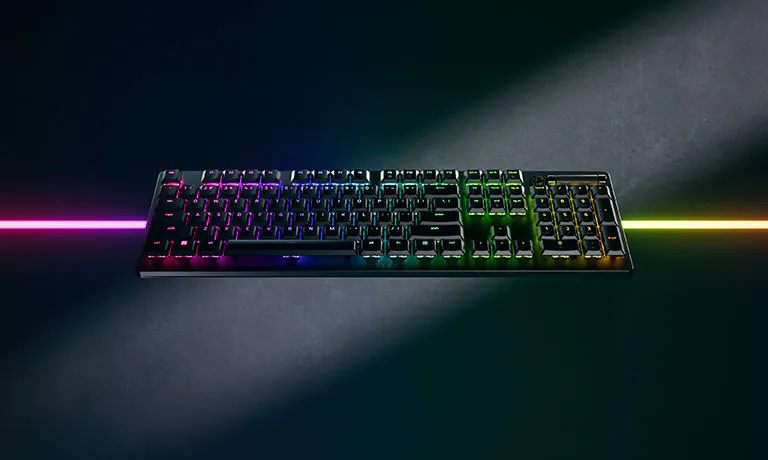
What this exact model is
The Razer DeathStalker V2 Pro reviewed here is the full-size Black US model with Linear Red low-profile optical switches, product code RZ03-04360200-R3U1. That distinction matters because the DeathStalker family also includes a wireless Tenkeyless model and a wired full-size DeathStalker V2. They are not interchangeable buying decisions: one removes the number pad, while the other removes wireless operation.
Razer positions the Pro as an ultra-slim wireless optical keyboard with low-profile switches, a durable casing and HyperSpeed Wireless. The practical pitch is straightforward: keep the familiar full-size layout and dedicated number pad, but reduce the height and add flexible connections. It is aimed at someone who wants gaming responsiveness without moving to a compact board.
The Linear Red version is the quieter, smoother switch choice in this range. Razer says the linear switch has a smooth feel and sound dampeners, while its clicky alternative has tactile feedback and audible sound. Tom’s Hardware also identified its review unit as the linear option and described the switches as smooth, without a tactile bump.
That makes the switch choice more consequential than the color. If you prefer a pronounced bump for touch typing, Linear Red is less likely to provide the feedback you want. If you want a lower, quieter keypress for gaming or a shared room, the linear version is the relevant one. This is still a low-profile optical design, not a conventional full-height mechanical board.
Layout and desk fit
The board keeps the full-size arrangement: standard navigation keys, a number pad and a multi-function roller with a media button in the upper-right corner. That layout is useful for spreadsheets, accounting, repeated numeric entry and games that benefit from a dedicated navigation cluster. It also takes more horizontal space than the Tenkeyless version.
Tom’s Hardware lists a footprint of 17.2 inches by 5.5 inches, equivalent to 437 millimeters by 139 millimeters. That describes a relatively shallow full-size keyboard, but not a small one; check the desk’s usable width before prioritizing its slim profile.
The same independent review lists the weight at 1.7 pounds, equivalent to 776.5 grams. Tom’s Hardware described the board as sturdy with no discernible flex while typing. That is an independent physical assessment, separate from Razer’s claim that the 5052 aluminum alloy top plate adds durability and heft.
There are two sets of flip-out feet on the rear for changing the tilt angle. Tom’s Hardware reported that the more pronounced setting adds about 0.25 inches, equivalent to 6.4 millimeters, to the keyboard’s rear height. This gives you some adjustment, but it does not turn the low-profile board into a conventional raised keyboard.
The low height is therefore a fit preference, not automatically an ergonomic advantage. Razer says the slim profile is intended to support a neutral hand position, while Tom’s Hardware found the keyboard surprisingly comfortable to type on. Those are useful signals, but hand position, desk height and wrist habits still determine whether the shape works for you.
Wireless and wired connections
The DeathStalker V2 Pro offers 2.4GHz wireless through Razer HyperSpeed, Bluetooth 5.0 and a wired USB-C connection. Razer describes HyperSpeed as its low-latency gaming connection. For a desktop gaming setup, the 2.4GHz receiver is the most natural choice; Bluetooth is more useful when switching between general-purpose devices.
Razer says the keyboard can pair with a compatible mouse through the same HyperSpeed USB dongle. The company also provides a storage compartment underneath the keyboard for the receiver. Tom’s Hardware described that compartment’s cover as somewhat flimsy, so the storage feature is convenient but worth treating as a small moving part rather than a rugged travel case.
Bluetooth supports three connected devices, with three profile buttons used to switch between them. That is the strongest reason to consider this model for a mixed desk: one keyboard can move between a gaming PC, a work computer and another Bluetooth device without relying on several receivers.
The full-size Pro includes a USB Type-C port and can operate as a wired keyboard while charging when connected with a compatible USB Type-A to USB Type-C cable. Tom’s Hardware also reported that its review sample included a six-foot braided USB-C-to-USB-A cable and a USB extender. Use that description as the reviewed package, and check the selected listing’s box contents rather than assuming an accessory bundle is included.
The full-size Pro is more flexible than a wired DeathStalker V2, but that flexibility adds battery management and a receiver to the desk equation. If the keyboard will never move and cable routing is easy, the wired model category is simpler. If you regularly change devices or want a clear desktop, the Pro’s connection options have a practical purpose.
Battery expectations
Battery information needs careful interpretation because the supplied records describe different conditions. Razer’s current product page advertises up to 200 hours and says the keyboard includes a Type-C cable for wired use while charging. That is a manufacturer maximum, not a universal runtime for every brightness and connection setting.
Tom’s Hardware records an earlier Razer figure of 40 hours with the backlight set to 50 percent brightness. The reviewer also reported needing several charges during testing with bright lighting. The available sources do not establish why the current maximum differs from the earlier figure. Keep the documented lighting condition attached to the older estimate rather than assuming a firmware change explains the difference.
The sensible buying conclusion is to treat runtime as variable. Bright per-key RGB, wireless mode and usage intensity all affect how often charging becomes part of ownership. If long periods away from a cable matter, plan around your lighting preference instead of assuming the largest advertised number.
Razer provides a keyboard shortcut for checking battery status: pressing Fn plus End illuminates five LEDs above the arrow keys. The company says each LED represents approximately 20 percent of battery life. That is a quick onboard estimate, although it does not replace a precise percentage display.
Switches, lighting and controls
Razer specifies a 70-million-keystroke lifespan for its low-profile optical switches. That is a manufacturer durability specification, not a prediction of how the keycaps, stabilizers or wireless battery will age. The keyboard’s overall ownership life depends on those other parts as well.
The keyboard has per-key Chroma RGB lighting, and Razer says its keycaps use laser-etched legends with HyperGuard coating. The company further describes the coating as more fade-resistant than doubleshot PBT in its lab testing. Tom’s Hardware, however, reported small scratches on several keys after placing the keyboard in a bag with other items. The two records support a cautious conclusion: the coating is a design feature, not a reason to ignore physical abrasion.
Razer says the keycaps include backlit secondary legends, while noting that secondary legends may differ for regional layouts. That matters for this US version if you rely on alternate functions in a dim room. It also reinforces why buying the exact regional model is preferable to assuming every DeathStalker V2 Pro keycap marking is identical.
The aluminum roller and media button can be configured for functions such as playback, brightness and volume. These controls are more useful than decorative lighting when the keyboard is also used for music, video or general desktop work. Razer says most keys can be remapped through Synapse 3, while Tom’s Hardware noted that the Windows key, HyperShift key and multimedia button could not be remapped in its review.
Razer’s current page says six lighting effects can be changed without Synapse by holding Fn and Ctrl and pressing number keys from 2 through 7. Full customization still depends on Razer software. That split is useful: basic lighting does not require software, but advanced remapping, effects and device management do.
Software and gaming features
Razer Synapse stores up to five onboard profiles according to the independent specifications table. That can reduce the need to reconfigure the board when moving among games or work routines. The usefulness depends on whether your preferred settings fit the onboard profile system and whether you are comfortable using Razer’s software ecosystem.
The keyboard supports Razer Snap Tap through Synapse 4. Razer describes Snap Tap as prioritizing the latest input between two selected keys without requiring release of the previous key. It is a specialized gaming feature, not a general typing improvement, and buyers should check whether it suits their games and input preferences before treating it as a reason to upgrade.
Tom’s Hardware described the low-profile linear switches as particularly good for gaming because of their smooth feel, quick actuation and shorter travel. That is an independent reviewer’s assessment, not a performance benchmark. The same review found the feel somewhat mushy and said the lack of tactile feedback affected typing accuracy for that reviewer.
Those observations point to the central trade-off. The board favors speed, quietness and a low key height over a crisp tactile event. Gamers who bottom out quickly or prefer smooth linear movement may appreciate that balance. Writers who use tactile feedback to confirm each press may prefer a more pronounced switch, even if that means accepting more sound and height.
Maintenance and compatibility
The keyboard uses unique stabilizers for its low-profile keys. Razer says its PBT and Phantom keycap upgrade sets are not compatible with the DeathStalker V2 line. That limits the usual mechanical-keyboard customization path, so do not buy this model expecting a broad aftermarket keycap project.
Maintenance is consequently more about keeping the supplied keycaps and stabilizers clean than planning routine part swaps. The laser-etched legends and RGB lighting are integrated into the product’s appeal, but the independent scratch report makes careful transport worthwhile. A sleeve or separate compartment is more sensible than placing it loose beside metal or hard objects.
Razer lists support for up to 2 years of warranty coverage and says direct RazerStore purchases include 14-day risk-free returns. Those policies are manufacturer terms and may vary by purchase route or region. They are worth checking at checkout, especially because the keyboard’s specialized switches and stabilizers make replacement preferences narrower than with a standard mechanical board.
Full-size, TKL or wired?
Choose the full-size Pro when you need a number pad, want wireless switching, and specifically prefer a low-profile linear optical feel. Its combination of 2.4GHz, Bluetooth and wired operation is more useful for a multi-device desk than a single-purpose wired keyboard.
Choose the DeathStalker V2 Pro Tenkeyless when desk width matters more than numeric entry. The supplied manufacturer material identifies it as a separate lineup model, but does not provide enough technical detail here to make additional feature claims about its dimensions, battery or switch configuration. The safe comparison is its reduced layout category, not an assumption that every specification is identical.
Choose the wired full-size DeathStalker V2 when you want the same family’s full-size concept without wireless charging or receiver management. The supplied independent source identifies it as a wired full-size alternative, but does not establish its complete specifications. Its main advantage in this comparison is the simpler connection model, not an unsupported claim about performance or construction.
Verdict
The Razer DeathStalker V2 Pro full-size Linear Red is a focused choice for a low-profile wireless gaming keyboard with a number pad. Its strongest case is the combination of a restrained full-size footprint, three connection methods, multi-device Bluetooth, onboard profiles, per-key RGB and a dedicated control roller.
Its limitations are equally specific. Battery life depends heavily on settings, the current manufacturer maximum differs from the older manufacturer estimate recorded in the independent review, without a fully documented explanation in these sources, and the keycap ecosystem is restricted by unique stabilizers. Linear switches also trade tactile confirmation for smooth, quiet movement, which will not suit every typist.
Buy this exact RZ03-04360200-R3U1 model if you want full-size input and wireless flexibility more than broad customization or predictable long-runtime behavior. Pick the Tenkeyless category for a smaller desk, or the wired full-size category for a permanently connected setup. The Pro makes the most sense when its connectivity and low-profile feel solve a real desk problem rather than simply adding features.