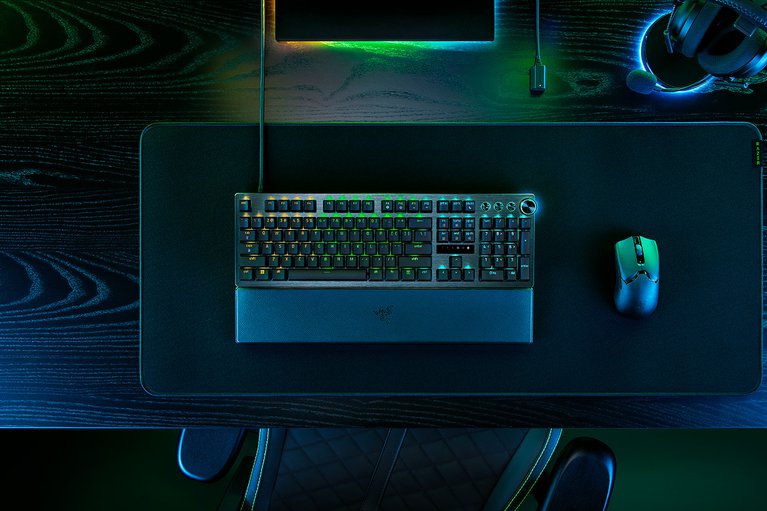
The Razer Huntsman V3 Pro is a full-size wired gaming keyboard for buyers who want more control over key response than a conventional board provides. Its central appeal is not simply RGB lighting or a familiar layout. The real decision is whether adjustable actuation, Rapid Trigger and analog input justify choosing a feature-heavy keyboard over a simpler board.
This review concerns the Razer Huntsman V3 Pro RGB Backlit Full-Size Wired Gaming Keyboard, Black, US, identified in the supplied product listing as ASIN B0CG7FQML2. That distinction matters because the independent reviews supplied for this article cover the Huntsman V3 Pro TKL. Their observations are useful context for the shared switch and software platform, but their layout-specific measurements should not be presented as full-size specifications.
What this keyboard is for
Razer lists this version as Full Size. In practical terms, that makes the number pad the defining reason to choose it over the TKL or Mini versions. It suits a desk that combines gaming with numeric entry, spreadsheet work or frequent number-pad shortcuts.
The trade-off is physical space. A full-size keyboard uses more horizontal room than a tenkeyless or compact model, and the number pad places the mouse farther to the right. That is the normal cost of retaining the keypad, not a flaw unique to this product. Buyers with a narrow desk should measure the keyboard area before prioritizing the extra keys.
Razer specifies its second-generation Analog Optical Switches for this keyboard. The supplied TKL reviews identify the same switch family as the foundation for adjustable actuation and Rapid Trigger. That makes their software and switch observations relevant context, while leaving the full-size board’s footprint and layout-specific measurements separate.
Adjustable actuation and Rapid Trigger
Adjustable actuation changes how far a key must travel before registering. Laptop Mag reports a 0.1 millimeter to 4.0 millimeter actuation range in Synapse for the reviewed TKL, while its account of the onboard controls describes a range from 0.1 millimeters to 3.6 millimeters. PC Gamer also reports onboard adjustment from 0.1 millimeters to 3.6 millimeters. These figures belong to the independently reviewed TKL platform; Razer’s supplied full-size passage confirms adjustable actuation without publishing a numeric range.
That distinction should shape expectations. A shallow setting may suit a player who wants quick registration, while a deeper setting can provide more separation from accidental presses during ordinary typing. The useful feature is the ability to tune response around different games and habits, not one universally correct setting.
Rapid Trigger approaches the problem from the release side of a keypress. Laptop Mag explains that it modifies the reset point, allowing a key to be pressed repeatedly without relying on its default actuation behavior. PC Gamer describes separate Rapid Trigger adjustment through the keyboard controls. This is aimed at fast repeated or directional inputs; it does not automatically make every typing task better.
PC Gamer describes an onboard workflow using the function key, Tab and the media dial to vary actuation. The same review says a light-up gauge above the arrow keys demonstrates the selected key-press depth. That gives the adjustment system a practical advantage for owners who want to change response without opening a desktop application.
Analog input and profiles
Razer lists Analog Input and Dual-step Actuation among the keyboard’s features. Laptop Mag reports that the TKL’s Synapse options can use key pressure to mimic varying controller-stick movement and trigger pressure. That may appeal to players who want gradual movement from a keyboard, but it adds a second input model to configure.
Laptop Mag also reports that analog movement failed to register in Elden Ring during its review. In Enshrouded, the movement worked but repeatedly switching between keyboard and gamepad inputs caused confusion. These are independent TKL observations rather than a universal result for every title, but they establish that analog compatibility can require game-specific troubleshooting.
Razer lists hybrid onboard storage for up to six profiles. That gives the full-size keyboard a way to retain multiple configurations rather than forcing one actuation setup for every game and desktop task. Razer also lists quick onboard adjustment for actuation and Rapid Trigger.
Laptop Mag reports five preloaded profiles on the TKL: Factory Default, Racing, FPS Rapid Trigger, Analog WASD and High Sensitivity. Because that report covers the TKL, it should be read as software-platform context rather than a confirmed full-size profile count. The manufacturer’s direct full-size specification is the stronger evidence for up to six onboard profiles.
The profile system is most useful when the owner actually switches between different response behaviors. A default profile for ordinary typing, a faster profile for competitive games and a separate analog profile are easier to understand than changing one configuration constantly. Clear profile names also reduce the chance of carrying an unusual setting into unrelated work.
Software and setup
Razer Synapse is the deeper configuration layer. Laptop Mag reports options for individual-key actuation, Rapid Trigger sensitivity, gamepad remapping and lighting behavior. Razer lists fully programmable keys, on-the-fly macro recording and Gaming Mode. Those controls broaden the keyboard’s uses, but they also increase the number of settings an owner must learn.
The onboard controls reduce the need to open Synapse for every adjustment. PC Gamer found the quick actuation process initially fiddly but said it became easier after repeated use. That is a useful distinction: the keyboard is not necessarily difficult because the controls are inaccessible, but the control scheme is more involved than a standard media-key layout.
Laptop Mag describes the software as finicky and reports that some behavior worked more reliably after configuration in Synapse. Buyers should therefore treat the application as part of the ownership decision, not as an optional extra that will never matter. The keyboard’s strongest features depend on understanding profiles, mappings and response settings.
Gaming Mode is a practical example. Laptop Mag reports that it disables the Windows key and that Synapse can extend the behavior to the Menu key, Alt+Tab and Alt+F4. That can reduce accidental desktop interruptions during play, although users should remember which shortcuts they have disabled when returning to ordinary work.
Build, typing and desk fit
Razer lists a brushed aluminum alloy top case, doubleshot PBT keycaps and a magnetic firm leatherette wrist rest. The materials support the keyboard’s premium positioning, while the detachable wrist rest lets an owner decide whether the added support suits the desk and hand position.
Independent TKL coverage is positive about the shared design language. PC Gamer describes a rounded aluminum backplate and a premium feel, while Laptop Mag describes the magnetic leatherette palmrest as comfortable and the keycaps as durable. Those are independent reviewer observations of the TKL, not observations by TopDataLLC or evidence of full-size dimensions.
PC Gamer’s sibling TKL review says the keys can become noisy during sustained typing, although not to the extent of Razer’s Green Clicky or Orange Tactile mechanical switches. This is evidence about the related switch platform in the reviewed TKL, not a separate noise measurement of the full-size keyboard. A private gaming room is therefore a more natural setting than a shared office where repeated key noise could distract nearby people.
The full-size layout also changes mouse positioning. The number pad is useful for data entry and shortcuts, but occupies space that a mouse hand might otherwise use. A low-sensitivity competitive player may prefer a keypad-free board, while a mixed work-and-gaming user may consider the number pad worth the additional width.
Razer lists a detachable Type-C cable and no passthrough. The detachable connection can simplify cable replacement or transport, while the absence of passthrough means the keyboard does not provide a convenient USB port for another accessory. It remains a wired keyboard, so the desk should have a practical cable route.
Lighting and controls
Razer lists Chroma RGB backlighting and a multi-function dial with three dedicated buttons. The dial has a role beyond media control because PC Gamer describes it as part of the onboard actuation-adjustment process. That gives the top edge a functional purpose alongside the lighting.
PC Gamer describes the TKL’s RGB as even and adjustable through Synapse, while also finding it dimmer than expected at maximum brightness. This is an independent observation from the TKL rather than a brightness measurement for the full-size version. Buyers who prioritize vivid illumination should view the lighting as configurable feedback rather than assume it will be exceptionally bright.
Razer lists a 1000 Hz polling rate and N-key rollover with anti-ghosting. Those are relevant input specifications: rollover addresses simultaneous key recognition, while polling describes how often the keyboard reports input. They support the competitive feature set, but do not establish a particular in-game advantage.
Ownership limitations
The main ownership task is configuration management. Profiles, macros, lighting, analog mappings and actuation settings can each be useful, but they also create more opportunities for an unfamiliar setting to remain active. A clearly labeled default profile is a sensible fallback for ordinary typing.
The supplied manufacturer record lists PBT keycaps and an aluminum top case, but does not provide cleaning instructions or a repair procedure. Maintenance should therefore stay conservative: keep dust and spills away from the switches, disconnect the detachable cable before moving the board and follow Razer’s current support guidance rather than improvising disassembly.
The largest limitation is complexity. Laptop Mag identifies finicky software, while PC Gamer says some profiles have limited use. Those findings align with the product’s design: it offers more adjustment than many users need. If actuation is rarely changed, analog input is irrelevant and macros are unnecessary, much of the feature set may remain unused.
The other important limitation is the evidence boundary. The supplied full-size manufacturer passage confirms the layout, switch type, lighting, wrist rest, onboard storage, cable, keycap material and feature set. It does not provide full-size weight or chassis measurements in the supplied excerpts, so the TKL’s reported measurements should not be copied into this product’s specification card.
Alternatives and buying decision
The Huntsman V3 Pro TKL is the closest category alternative when competitive desk space matters more than a number pad. The independent reviews describe that version as particularly relevant to competitive players and less compelling for some casual users. The full-size version makes more sense when numeric entry and the complete layout are part of the daily routine.
A smaller analog or Rapid Trigger keyboard may suit a compact desk better, but the supplied evidence does not establish detailed specifications for named competitors. PC Gamer mentions the NZXT Function 2 and Wooting 60HE as keyboards offering dual actuation, and names SteelSeries, Wooting and NZXT as alternatives for buyers with tighter budgets. Those references support category comparison, not a full competitor specification table.
Choose the full-size Razer Huntsman V3 Pro if you need a number pad, prefer a wired connection and will actively use adjustable actuation, Rapid Trigger or analog input. The case is strongest for competitive players and mixed work-and-gaming users who are prepared to configure profiles carefully.
Choose something simpler if you mainly want ordinary typing, basic RGB or a low-effort plug-in setup. The independent reviews consistently frame the Huntsman V3 Pro family as more compelling for competitive players than casual users, while identifying software friction and high cost as meaningful drawbacks.
Verdict
The Razer Huntsman V3 Pro Full-Size is a specialized keyboard with one practical everyday advantage: it keeps the number pad while adding controls normally associated with enthusiast gaming boards. Its analog optical switches, Rapid Trigger, programmable controls, wrist rest, PBT keycaps and RGB create a broad feature set, but that breadth only pays off when the owner will tune and maintain it.
My conditional verdict is clear. Buy this exact US full-size version when the keypad matters and configurable fast input is a real priority. Skip it for casual play, quiet shared workspaces or a simple keyboard routine, where the additional software and configuration may be obligations rather than benefits.