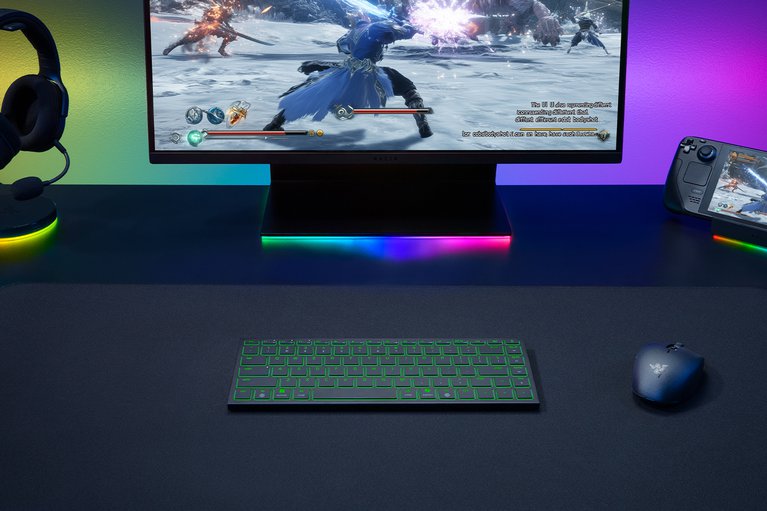
The Razer Joro is designed for people who want a keyboard that travels more easily than a conventional gaming board. The exact product considered here is the black US-layout RZ03-02360200-R3U1, not the optional package that adds a travel case. Its pitch combines a compact layout, shallow scissor keys, Bluetooth, wired USB-C and gaming-oriented lighting.
That combination creates a more specific buying decision than the product name suggests. The Joro is not simply a smaller mechanical keyboard. It is a low-profile scissor board that prioritizes packing convenience, while adding features such as Chroma RGB and Snap Tap. The useful question is whether those extras matter enough to accept its fixed angle and less traditional typing feel.
PC Gamer’s independent review is particularly important here because the manufacturer page supplied for this product emphasizes portability and features rather than long-session ergonomics. PC Gamer describes the Joro as slim and lightweight, but also reports compromises in comfort, key feel and battery life. Those findings should frame expectations before comparing it with either a basic Bluetooth keyboard or a compact mechanical model.
Exact model and layout
Razer’s page identifies the product as the Joro Portable Wireless Gaming Keyboard and shows a US-layout selection. It also shows a separate Joro option bundled with a travel case. Buyers should check that the listing says keyboard only if they do not want to pay for or carry the additional case.
The board uses a 75% layout, according to PC Gamer’s specification list. That makes it substantially more compact than a full-size board while preserving more of the main typing area than a highly reduced travel keyboard. The supplied evidence does not provide a full key map, so anyone dependent on a particular navigation, function or punctuation key should confirm its position before ordering.
PC Gamer measured the keyboard at 30 centimetres across and 381 grams. Those are independent measurements rather than figures shown in the supplied Razer passages. They establish a meaningful packing advantage over a full-size mechanical keyboard, although the complete travel load still includes the computer, charger, mouse and any cable needed for wired use.
The keycaps are laser-etched ABS, according to PC Gamer. The same review says the low-profile caps readily collect smudges and fingerprints. That is less a performance problem than an ownership detail: the Joro’s compact, clean appearance may require more frequent wiping than a buyer expects from a keyboard intended for travel.
PC Gamer also describes the chassis as aluminium. That supports the impression of a more substantial portable board than a very flexible budget keyboard. It does not establish water resistance, a drop rating or any other ruggedization standard, so the aluminium construction should not be treated as evidence that the Joro is suitable for careless handling.
Connections and gaming features
PC Gamer lists Bluetooth 5.0 and wired USB-C connectivity. Bluetooth suits a mobile desk with fewer cables, while USB-C gives the keyboard a wired operating mode at a permanent workstation. The supplied evidence does not explain the pairing process or confirm how many Bluetooth devices can be remembered, so those should not be assumed from the connection listing.
The specification list also gives the Joro a 1,000 Hz polling rate in wired mode. That condition matters: the supplied evidence does not support extending the 1,000 Hz figure to Bluetooth operation. For documents, messages and ordinary shortcuts, polling rate is unlikely to be the deciding feature. It matters more to someone who wants one portable board that can also serve occasional PC gaming.
PC Gamer lists N-key rollover and storage for up to five profiles. N-key rollover is relevant when several keys are pressed together, while profile storage gives the board a more gaming-focused feature set than a basic office keyboard. The source does not explain profile selection or retention, so five profiles should not be confused with confirmed multi-device Bluetooth switching.
Razer presents Chroma RGB as one of the Joro’s headline features. PC Gamer describes the lighting as subtle and attractive, and separately reports that the keyboard includes Snap Tap technology. Those additions distinguish the Joro from a plain travel keyboard, but they matter only if the buyer wants gaming-oriented controls and illumination rather than the simplest external typing device.
Battery life is the clearest cost of using that lighting. PC Gamer says Razer estimates about five hours with RGB set to 100%. The reviewer reports about seven and a half hours under the review’s own conditions. Because those figures come from different conditions, maximum-brightness RGB is better treated as a short-session setting than as an all-day wireless mode.
That distinction changes how portable the keyboard feels in practice. A USB-C cable can address the problem at a desk, but needing one more often reduces the benefit of carrying a wireless keyboard. The supplied sources do not provide a general battery figure for every lighting level, so buyers should not infer a single runtime for all Chroma settings.
Typing feel and physical fit
The Joro’s scissor mechanism places it closer to a laptop-style keyboard than to a compact mechanical board. PC Gamer says the switches feel slow and sluggish compared with what the reviewer was accustomed to from a mechanical keyboard. That is an independent assessment, not a universal measurement, but it clearly identifies the feel difference that mechanical-keyboard buyers should investigate.
The typing angle is a more fundamental physical limitation. PC Gamer reports that the Joro sits at an uncomfortably low angle and cannot be adjusted. A buyer can change desk position or chair position, but the keyboard itself offers no supported angle adjustment to match a preferred setup.
PC Gamer also reports arm strain after several hours of use. That is the reviewer’s experience rather than a result that applies to every owner. It is still a relevant warning for anyone who already finds flat laptop-style keyboards tiring or who wants a portable board for full workdays rather than shorter sessions.
The low-profile keycaps create a separate gaming concern. PC Gamer says they are harder to find by touch during intense play, while the same review describes the Joro’s gaming performance as surprisingly passable for a keyboard of its type. The practical takeaway is not that the keyboard cannot play games, but that users moving from taller or more sculpted keycaps may need to adapt.
The Joro has no wrist rest, according to PC Gamer’s specifications. That keeps the travelling package simpler, but it removes one possible way to alter the contact point in front of the keys. Combined with the fixed angle, the omission confirms that the board is a compact convenience product rather than a highly adjustable ergonomic design.
Work and travel use
For travel, the Joro’s strongest case is the combination of its 75% layout, 30-centimetre measured width and 381-gram measured weight. Those figures make it easier to justify in a laptop or tablet bag than a full-size mechanical keyboard. They do not, however, prove that it is more comfortable or more satisfying for long typing sessions.
PC Gamer specifically found that the Joro did not offer much extra portability, comfort or typing feel over a cheap Bluetooth keyboard. That comparison is central to the value question. The Joro’s additional gaming features need to be useful to the buyer; otherwise, a less specialized board may address the same travel problem with fewer compromises.
The aluminium chassis and laser-etched keycaps may appeal to buyers who want a more deliberate physical design than a generic office keyboard. The evidence does not establish durability beyond the chassis description, so the sensible ownership plan is ordinary care: use a case or sleeve if the keyboard will share a crowded bag, and do not assume it is sealed against travel mishaps.
The keycap finish also makes maintenance part of the choice. PC Gamer says the ABS caps are prone to fingerprints and smudges. The supplied sources do not give a cleaning or liquid-resistance specification, so keeping the keyboard dry and using gentle surface cleaning is more defensible than treating it like a rugged, washable accessory.
The US layout deserves attention even when the physical size looks right. Buyers who work across regional keyboard standards should check modifier and punctuation placement against their existing setup. The supplied Razer page confirms the US-layout selection, but it does not document the detailed differences among other regional versions.
Gaming and alternatives
The Joro’s gaming identity is credible but narrow. Wired 1,000 Hz polling, N-key rollover, Snap Tap and Chroma RGB provide features beyond a basic travel keyboard. They do not change the scissor-switch feel, remove the fixed angle or make the low-profile keycaps easier to locate by touch.
For occasional gaming away from a main desk, those compromises may be acceptable. The independent review found the gaming performance surprisingly passable for this type of keyboard. For someone buying primarily for competitive play, however, the slower-feeling switches and touch-discovery concern make a mechanical alternative worth considering before paying for portability features.
A basic Bluetooth keyboard is the most direct alternative category. It is likely the better fit when the priority is straightforward document entry and the buyer does not need Chroma RGB, Snap Tap or wired high-polling operation. PC Gamer’s finding that the Joro adds little portability, comfort or typing feel over a cheap Bluetooth board makes this a serious comparison rather than a budget straw man.
A compact mechanical keyboard suits a different priority: switch feedback, a more deliberate key feel and a gaming experience that is not designed around scissor mechanisms. The supplied sources do not support a model-specific size, weight or battery comparison, so the relevant trade-off is category-level: mechanical boards may offer the desired feel, while the Joro places more emphasis on a slim travel format.
A laptop keyboard is another useful benchmark. If the buyer already carries a laptop and only needs occasional external typing, a separate keyboard may add complexity without solving a major problem. The Joro has a clearer role when the laptop is raised on a stand, when a tablet or compact desktop needs separate input, or when portable gaming features are genuinely wanted.
Verdict
The Joro is best suited to a traveler who specifically wants a 75% US-layout scissor keyboard with Bluetooth 5.0, wired USB-C and gaming extras. The 30-centimetre measured width and 381-gram measured weight make the packing argument credible, while Chroma RGB, Snap Tap, N-key rollover and five-profile storage give it more identity than a plain office board.
Choose another category if adjustable positioning, long-session comfort, mechanical key feel or simple long-lasting wireless use matters more than lighting and gaming controls. The fixed low angle, shallow keycaps, fingerprint-prone ABS surface and conflicting battery-runtime conditions are not minor footnotes; they define how much use the Joro can comfortably cover.
PC Gamer judged the Joro’s review-time asking price too high for its compromises. That is the reviewer’s value judgment, rather than a statement about today’s price. Razer’s page displays its own listing price and promotional information, but those details can change and should be checked at the time of purchase.
My conditional verdict is cautious. Buy the Razer Joro when its compact travel format and Razer-specific gaming features solve a real setup problem, especially if scissor keys are preferred. Skip it for a general-purpose value purchase when a basic Bluetooth keyboard is enough, or when the more expressive feel of a compact mechanical board is the main reason for upgrading.