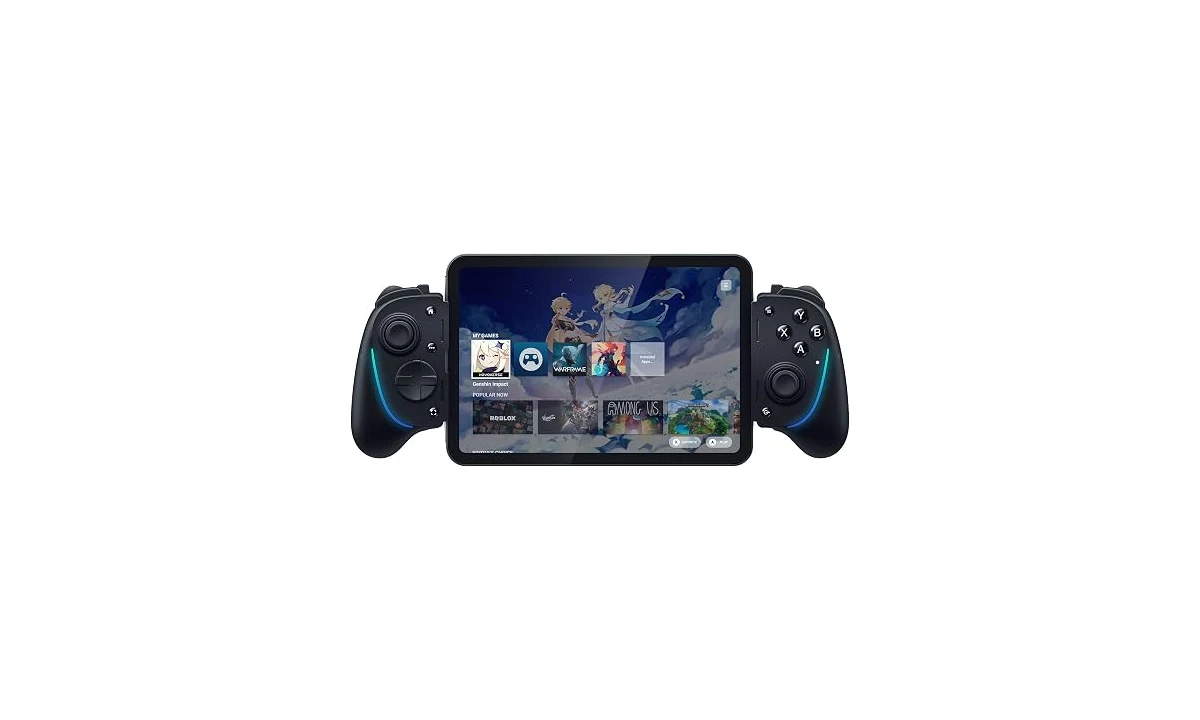
The Razer Kishi Ultra is a large USB-C mobile controller for people who want their phone or small tablet to feel closer to a conventional handheld gaming system. It puts full-sized grips and console-style controls around the screen instead of asking you to balance a phone above a separate gamepad. The trade-off is physical bulk, together with a set of features that varies significantly between platforms.
It is most convincing when mobile or streamed games are already an established part of your routine. It is less convincing as an expensive experiment to discover whether you like playing on a phone. Before buying, verify the exact device fit and the games you intend to use. A controller's list of capabilities does not make every mobile title accept physical controls.
Check the exact Kishi model
This review covers the black Kishi Ultra, not the Kishi V2 or a later Kishi V3 model. Razer's current page describes a full-sized form factor, USB-C connection and support for selected phones and small tablets. Product names across the Kishi range are similar, so match the actual listing and photographs rather than assuming a recommendation for one version applies to the others.
The device sits between the controller halves with the USB-C connection engaged. That makes the phone's port position, case shape and physical dimensions important. Razer says the supplied rubber cushions can be swapped or removed to improve fit, while warning that cases covering the USB port may be incompatible. A case being popular is not a guarantee that this particular combination fits securely.
Razer currently lists the iPhone 15 and 16 families, iPad mini sixth generation and iPad mini with A17 Pro, alongside supported Android devices and tablets up to eight inches. Check the current compatibility list for your exact device. Do not assume that every newer phone, folding phone or USB-C tablet inherits support merely because its connector looks similar.
The fit check should include removal as well as insertion. Windows Central's original review praised the controls but called attention to the rigid connector and the care needed when removing a device. That is a practical limitation to understand before buying. Follow the manufacturer's fitting method and avoid treating the controller as though the phone can simply be twisted free.
Console-style controls, with an important distinction
The Kishi Ultra provides full-sized analog thumbsticks, a directional pad, action buttons, analog triggers and additional bumpers. Its larger grips are a major part of the proposition. Buyers who find very compact mobile controllers cramped may appreciate the extra room, but someone prioritizing a small travel bag may regard the same design as the main drawback.
Razer specifies Hall Effect analog triggers. Do not turn that into a claim that every analog component uses Hall Effect sensing. Windows Central explicitly distinguishes the trigger design from the thumbsticks. This matters when comparing products marketed around different stick technologies: a feature attached to the triggers does not automatically describe the sticks.
The manufacturer describes mecha-tactile action buttons and directional controls, while the reviewer at Windows Central found the inputs particularly satisfying. Those are useful reasons to investigate the controller's feel, not a promise that it matches every person's preferred console pad. Button resistance, thumb reach and the position of the extra bumpers remain personal parts of the choice.
Consider the games you actually play rather than a generic idea of console quality. A game dominated by directional changes asks different things of the pad from one based on gradual steering or repeated action-button combinations. The Kishi Ultra offers a broad control arrangement, but the best fit is the one whose important controls remain comfortable in your own play.
Connection and game support
The USB-C connection avoids a Bluetooth-pairing step between the controller and the attached device. It does not eliminate the need for software compatibility. Check whether a game supports physical controllers on your platform and whether the intended service or application recognizes this model. A game that supports a controller on one operating system may behave differently on another.
For cloud gaming, the controller is only one part of the path. The service, subscription where required, game availability and network conditions still matter. A direct controller connection cannot repair an unstable stream or make a title available in a region where the service does not offer it. Evaluate the complete arrangement before assigning the controller responsibility for the whole experience.
A separate conventional gamepad remains a useful baseline. If you already own one that works with your device, try the intended games with that arrangement first. The Kishi Ultra's integrated screen position and grip may be more convenient, but those benefits are easier to judge after you know that the actual software experience is something you want to repeat.
The manufacturer also describes wired use with a PC or iPad. Treat that as another documented use case with its own connection and software requirements, rather than assuming the mobile mounting arrangement is necessary for every session. Check the required cable and platform support before relying on it as a replacement for an existing computer gamepad.
Haptics are not identical across platforms
Razer Sensa HD Haptics is one of the Ultra's distinctive features. The current manufacturer page requires Android 12 or later or Windows 11 for the described haptic functions and says they are not currently supported on iOS. An iPhone buyer should therefore make the purchase decision without assuming access to the same haptic experience shown in an Android demonstration.
That platform difference can change value substantially. Someone who wants the larger grips and action controls may still find the controller worthwhile without haptics. Someone whose main reason to upgrade is the advertised vibration system should verify the exact supported setup first. Do not pay for a feature on the assumption that a shared product name means a shared software experience.
Razer's haptic customization includes intensity adjustment and filtering of dialogue from the audio-based response. These are settings to evaluate rather than a requirement to keep the effect at its strongest. A useful configuration should fit the game and your preferences without becoming distracting. If the extra effect does not add anything you enjoy, the control hardware remains the more relevant part of the purchase.
RGB lighting is similarly optional in the buying decision. It can contribute to the appearance of the setup, but it is not evidence of more accurate sticks, broader game compatibility or better device fit. Separate the features you will actively use from the ones that mainly make a product demonstration look impressive.
Razer Nexus and touch-control mapping
Razer Nexus provides game discovery, control customization, updates and other supported functions. Razer says the app itself does not require a subscription, while some applications reached through it may do so. That distinction is worth understanding before assuming the controller package includes a library of games or paid streaming services.
Virtual Controller Mode can map touch-screen controls to the controller, but Razer identifies this as an Android-only feature. It should not be presented as a universal way to add controller support to every mobile game. Check the particular title, supported mode and current instructions, and assess whether the resulting control arrangement is practical for the way that game is designed.
Mapping a touch interface involves more than assigning a physical button to a familiar-looking symbol. Menus, overlays and changing screen layouts can alter what appears in a particular position. A game with native controller support is a different proposition from a game being operated through a configured touch mapping. Evaluate that distinction rather than treating both as identical forms of compatibility.
Use the customization tools to solve specific problems. Adjust a dead zone if you have an identifiable control issue, or assign an extra bumper to a command you reach awkwardly. Keep a known default that you can return to. A collection of unfamiliar settings can make a controller harder to understand even when each option is useful in the right situation.
Charging and audio connections
Razer lists 15W passthrough charging and a 3.5-millimeter audio connection. Passthrough is convenient when a long session would otherwise require removing the controller to connect a charger. The stated capability does not guarantee that every phone charges at that rate during every game. The charger, cable, device and operating conditions remain part of the setup.
Check the intended charging arrangement before relying on it away from your usual desk. A connector being available does not mean the appropriate charger is included or already in your bag. Plan where the cable will run so that it does not pull on the mounted device or interfere with your grip during an ordinary playing session.
The audio connection is useful for compatible wired headphones or a headset, especially when the attached phone lacks an accessible headphone socket. Check the audio functions needed by your particular game and application. A physical socket should not be used as proof of every microphone, chat-mixing or platform feature that a separate gaming headset system might provide.
For a shared controller, record a simple setup routine covering the cushions, device insertion, connection and any required application. That can make switching users less confusing and reduce improvised fitting. The convenience of the system depends partly on how consistently the phone is mounted, not merely on how good the controller feels once a demonstration has everything arranged perfectly.
Bulk, travel and alternatives
Windows Central's reviewer found the larger controller comfortable during extended play but emphasized that it is not a pocket-sized accessory. That captures its main physical trade-off. It is suited to someone willing to make room for substantial grips around a screen. It is less suited to someone seeking the smallest possible item to carry for occasional mobile gaming.
Compare the controller with the device actually installed, not just with the empty frame. The screen and phone case affect the complete arrangement you will hold and pack. Think about whether you play seated at home, on a table during travel or while carrying a small bag. The same size can feel reassuring in one situation and inconvenient in another.
A compact telescopic controller is the relevant alternative when portability comes first. A conventional gamepad with a separate device support is relevant when you already like its controls and prefer not to mount the phone between the grips. Compare those complete arrangements, including the support and carrying method, rather than judging the controller alone on a retailer photograph.
Razer's own later models should also be treated as separate options with their own compatibility information. Do not assume a feature described for a newer Kishi is present on the Ultra. This review's recommendation depends on the Ultra's documented hardware and software boundaries, including the important differences between Android, Windows and iOS.
Verdict
Choose the Kishi Ultra if physical controls are already central to your mobile gaming, you want substantial grips, and the exact device and software combination is documented to work. Its extra bumpers, audio connection and customization can make a coherent system. Android and supported Windows users also have a different haptic proposition from iPhone users, which should be reflected in the decision.
Choose a smaller or simpler arrangement if gaming on a phone is occasional, bag space is limited or your favorite titles do not support the controls you need. The Ultra is most persuasive as a deliberate upgrade to an established habit. Verify fit and platform features first, then decide whether its larger design adds enough comfort and control to justify carrying it.