The buying decision
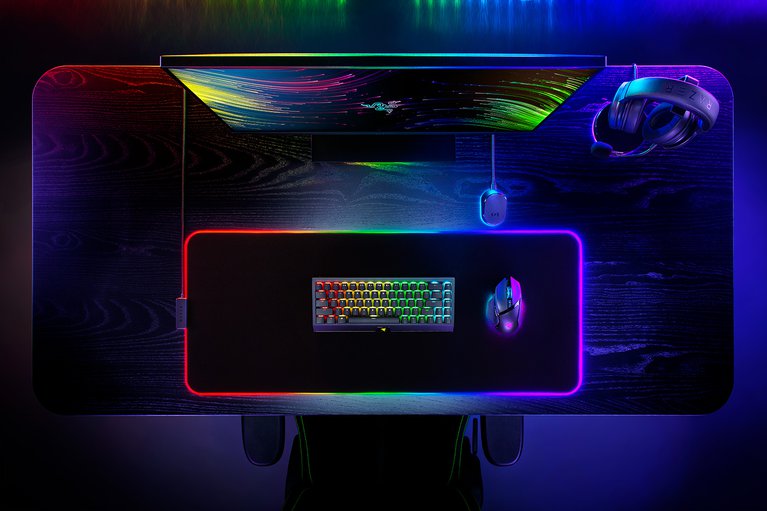
The Razer Strider Chroma is for a specific desk problem: you want the keyboard and mouse to share one broad surface, but you do not want a conventional cloth pad or a rigid hard mat. Razer presents this exact product as the Strider Chroma Hybrid Mouse Mat with Razer Chroma RGB. The black US model covered here is RZ02-04490100-R3U1, not a generic Strider listing or another Razer lighting accessory.
Its appeal has two parts. The surface is intended to sit between cloth and hard materials, while the perimeter adds configurable Chroma lighting. That makes this a layout and visual-design purchase as much as a mouse-control purchase. The sensible question is not whether RGB is inherently useful; it is whether the hybrid feel, extended coverage and coordinated lighting justify the space and extra complexity for your desk.
Tom’s Hardware describes the Strider Chroma as large enough for a keyboard and mouse without covering the entire desk. That makes it a potentially tidy foundation for a gaming or work setup, particularly when the mouse needs room to move beyond a small pad. It is less convincing for a shallow desk, a crowded desktop or a workspace where the mat would have to bend around stands and accessories.
Specifications that matter
The manufacturer identifies the mat as a hybrid soft/hard design and lists 19 Razer Chroma RGB lighting zones. Tom’s Hardware’s specification table identifies the surface as polyester, the base as rubber and the format as extended. Those details establish the product’s practical identity more reliably than a retailer title that might combine information from different Strider variants.
Tom’s Hardware lists the footprint as 35.4 x 14.6 x 0.16 inches (900 x 370 x 4 millimeters). The width is the first fit check: measure the clear desk area rather than assuming an extended mat will fit any gaming desk. The depth matters too, because the mat needs room in front of the keyboard and mouse instead of stopping at an inconvenient desk edge.
The stated 0.16-inch (4-millimeter) thickness is more substantial than a thin office-style pad. That can make the transition to the bare desktop more noticeable at the front edge, especially if your keyboard already has a particular typing height. The source records establish the measurement, not an ergonomic result, so your chair, keyboard and wrist position remain part of the fit decision.
A large mat also needs a reasonably clear, flat placement area. Tom’s Hardware notes that a pad is not useful as a consistent surface if it does not sit flat. Check for desk seams, raised accessories, monitor feet and cable bundles before buying. The rubber base is listed as part of the specification, but the supplied evidence does not establish a universal slip result on every desk finish.
Surface and mouse control
Tom’s Hardware describes the Strider Chroma’s hybrid surface as harder and slicker than cloth while retaining enough texture for controlled, precise movements. That is the functional reason to choose this model over a basic fabric pad. It aims for easier movement without removing all tactile feedback during smaller corrections.
The same review characterizes the product as a middle-ground option for people who do not want something too hard or too soft. That is a useful description, but it is not a promise that every mouse, sensor or playing style will feel identical. Mouse feet, hand pressure and sensitivity all affect whether additional glide feels helpful or excessive.
The trade-off is also clear in the independent description: the Strider Chroma remains less slick than a hard surface. If minimum friction is the priority, a hybrid mat is the wrong category to start with. If you dislike the abrupt contact of rigid plastic or glass, the retained texture may be more appealing, though personal preference still decides the result.
Compared with ordinary cloth, this Razer mat emphasizes a firmer glide and a more structured desk layout. Cloth remains the simpler choice when softness, low complexity or broad size selection matters most. The Strider Chroma adds a specialized surface and integrated lighting, so it makes sense only when those additions address an actual desk preference rather than merely sounding appealing in a specification list.
The surface also separates this model from the Razer Atlas. Tom’s Hardware describes the Atlas as a tempered-glass hard pad with a low-friction surface, no RGB and no Razer Synapse. That makes the Atlas a speed-first category alternative, not a direct replacement for the Strider Chroma’s textured hybrid feel and illuminated perimeter.
RGB lighting and software
The Strider Chroma has 19 RGB lighting zones, a figure shown in both the manufacturer listing and Tom’s Hardware’s specification table. Zone count indicates that the lighting is divided for control, but it does not establish brightness, physical spacing or how visible the effect will be from your seating position. Those are separate considerations from the number printed in the specifications.
Tom’s Hardware reports that the lighting can be customized in Razer’s Chroma Studio with different colors and effects, including audio-reactive effects. That gives the mat a place in a coordinated Razer setup. It also means the lighting is not simply a fixed decorative strip: buyers need to decide whether software configuration is a benefit or another peripheral-management task.
RGB has more value when the illuminated edge remains visible. A desk lip, bright room or objects placed around the border can reduce its visual impact. This is a buying inference from the product’s design, not a measured brightness finding. If the mat will usually be hidden beneath a deep keyboard, covered by equipment or used in a brightly lit office, the lighting premium may matter less.
The supplied manufacturer excerpt confirms the Chroma RGB identity and the 19-zone presentation, while the independent review supplies the Chroma Studio customization detail. Neither supplied passage establishes a connector type, cable length, operating-system list or lighting-memory behavior. Those are important compatibility questions, so check Razer’s current support documentation before purchase if software or cabling is decisive.
That documentation check is especially important for a desk with limited free ports. The evidence supplied here supports customizable lighting, but it does not support a complete setup sequence or a claim about operation without software. Treat those points as unresolved rather than inferring them from the Chroma branding.
Setup, fit and maintenance
Start setup by measuring the intended 35.4 x 14.6-inch (900 x 370-millimeter) area. Leave enough room for the keyboard and mouse to sit fully on the surface, and check that the front edge does not create an awkward transition to the desk. The mat’s extended format is useful only when the desktop can accommodate its full footprint.
The mat is not a full desk cover. Tom’s Hardware says it can hold a keyboard and mouse without covering the entire desk, which leaves space for other equipment beyond its perimeter. That can be an advantage for a mixed work-and-gaming setup, but it also means the mat’s edges may meet desk objects or exposed cables that need planning.
The 0.16-inch (4-millimeter) thickness deserves a second check after placement. A keyboard may feel different when it sits on the mat rather than directly on the desktop, and the front edge may affect how your forearms meet the surface. The available evidence supports the measurement but cannot determine whether that height will feel comfortable in your particular chair and keyboard combination.
Tom’s Hardware describes the edges as seamless, with no visible stitching. That supports the clean appearance of the RGB border and avoids the conventional stitched look common on cloth mats. It does not establish how the edge will age in every environment, so a neat initial appearance should not be treated as a complete durability assessment.
The independent review also reports that the surface is water-resistant and easier to keep clean than a standard cloth pad, while not being as easy to clean as a hard surface. This makes the Strider Chroma a reasonable middle ground for ordinary desk spills and dust. It is not evidence that the mat should be soaked or cleaned like a disconnected glass pad.
Use a conservative care routine: remove debris, use a suitable soft cleaning method and keep moisture away from the lighting and connection area. The supplied passages do not specify an approved cleaning solution, wash process or drying time for this exact model. Confirm those instructions in the current Razer documentation rather than borrowing a care method from another mat.
The RGB durability caveat
Tom’s Hardware reports a significant lighting issue after around two years of use: the RGB remained bright and vibrant, but the lower-right corner stayed red despite attempts to adjust it. That is an independent long-term finding, not a prediction for every unit. It is nevertheless important because the lighting is a central reason to pay more for this model.
The same report says the mat had been left on for two years straight. That context limits what can be concluded. It does not establish that switching the mat off will prevent discoloration, nor does it show that all units will develop the same problem. It does show why long-term lighting behavior belongs in the buying decision alongside surface feel and desk coverage.
The evidence does not report an equivalent problem with the hybrid surface itself. It would therefore be misleading to turn the lighting observation into a general claim that the complete mat has a fixed service life. The useful conclusion is narrower: buyers who value synchronized RGB should accept that the independent review found a meaningful color-control problem after extended continuous use.
Alternatives that clarify the choice
Tom’s Hardware lists the SteelSeries QCK Heavy as a thick, non-RGB cloth pad available in three sizes. Its large version is listed at 17.7 x 15.7 x 0.2 inches (450 x 400 x 6 millimeters), with a micro-woven cloth surface, no RGB zones, no software and a non-slip rubber base. It is a simpler category alternative, not an equivalent extended RGB mat.
The QCK Heavy is the more logical direction when you want a conventional cloth surface and no lighting management. Tom’s Hardware reports that its surface is hand-washable and that its rubber base stayed firmly in place during the reviewer’s mouse movements. Those findings apply to the SteelSeries product and should not be transferred to the Razer.
The Razer Atlas takes the opposite approach. Tom’s Hardware lists it as a tempered-glass pad measuring 17.72 x 15.75 x 0.2 inches (450 x 400 x 5 millimeters), with no RGB and no software. Its low-friction design suits someone who values speed and a hard surface more than the Strider Chroma’s texture, softness or lighting system.
The Razer Firefly V2 Pro is an alternative to investigate if you want lighting on a smaller, hard-surface mouse pad rather than an extended mat under both peripherals. Tom’s Hardware describes its backlit plastic construction. That changes both the desk layout and surface choice: compare the feel and working area you need before deciding that more illuminated surface is an upgrade.
These alternatives make the decision easier. Choose the Strider Chroma for an extended keyboard-and-mouse layout, hybrid glide and coordinated RGB. Choose the QCK Heavy when cloth, simplicity and size choice matter more. Choose the Atlas when minimal friction is the priority. Choose the Firefly V2 Pro when Razer lighting matters but a full extended mat would be too large.
Who should buy it?
The Strider Chroma fits a spacious desk user who wants one continuous surface beneath the keyboard and mouse. It is especially relevant when the hybrid feel is preferable to both soft cloth and rigid glass, and when visible RGB is part of the intended desk design. The surface is the functional reason to choose it; the lighting is the presentation reason.
It is a weaker fit for a compact or crowded desk, a setup that avoids software, or a buyer who wants the least expensive replaceable surface. It is also unsuitable as a speed-first choice if any remaining texture feels like a compromise. The fixed extended footprint solves a layout problem only when the desk has enough uninterrupted space.
Verdict
Buy the Razer Strider Chroma when you specifically want a 35.4 x 14.6-inch (900 x 370-millimeter) extended mat with a hybrid surface and customizable RGB. Its 0.16-inch (4-millimeter) thickness, rubber base and 19 lighting zones define a focused proposition rather than a universal upgrade. The product earns consideration when both coverage and desk presentation matter.
Choose a simpler cloth pad or a hard surface when those priorities do not apply. The Strider Chroma remains less slick than a hard mat, adds software and cabling questions that the supplied excerpts do not settle, and carries an independent report of RGB discoloration after around two years of continuous use. Its value is conditional: it makes sense when the hybrid feel and illuminated extended layout are worth those trade-offs.